Remote Direct Memory Access (RDMA) and Networking Configuration
Why Networking Matters
In prefill/decode disaggregation, the Key-Value (KV) Cache must transfer from prefill to decode workers before the first token can be generated. This transfer time lands directly on Time to First Token (TTFT) — and the cost grows with context length and model size.
For Wide Expert Parallelism, all-to-all GPU communication across nodes is on the critical path for every token generated.
Networking is a first-order concern for distributed inference latency.
The Networking Stack
llm-d uses a layered networking stack for KV Cache transfers and inter-node communication:
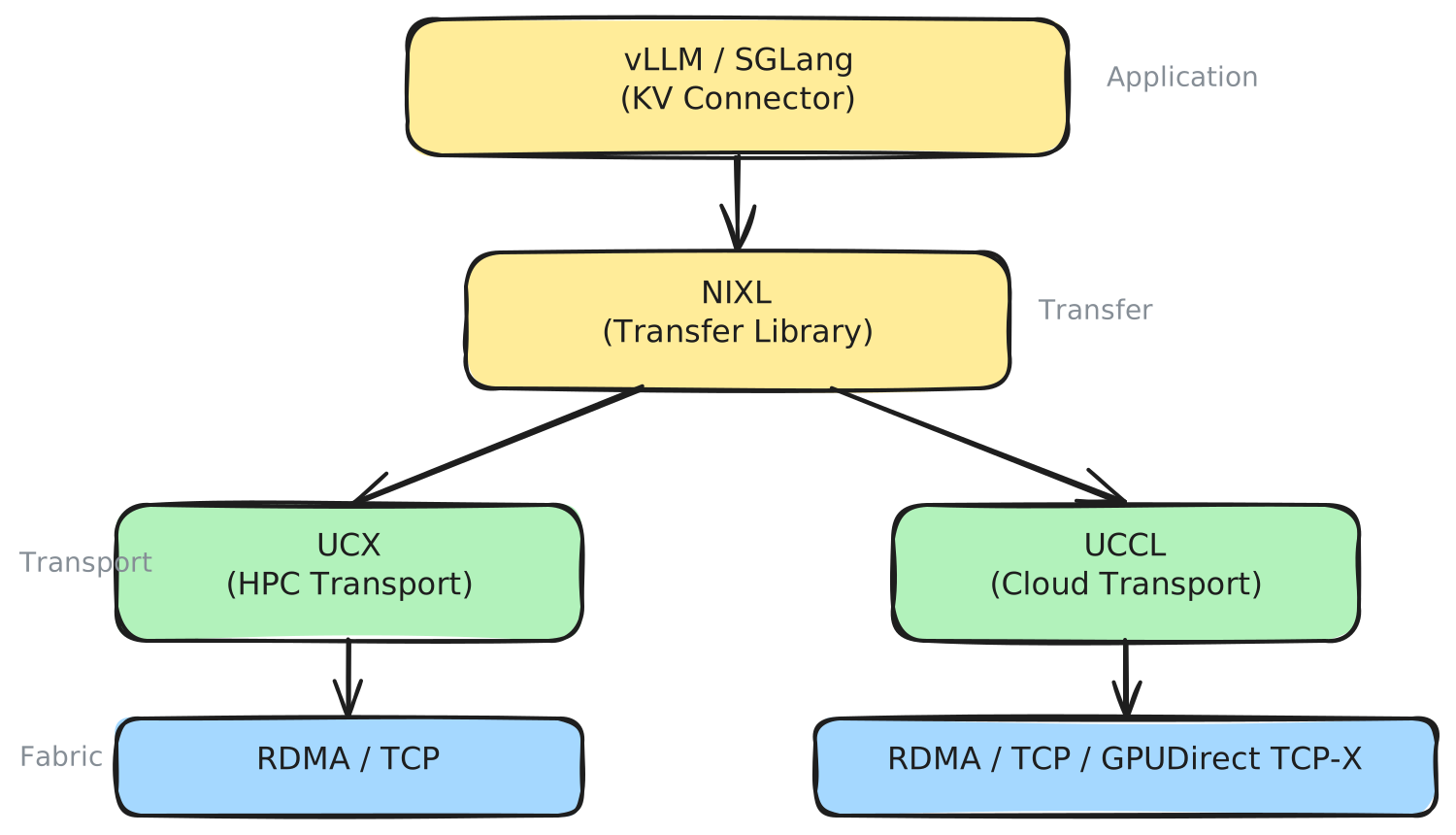
NIXL
NIXL (NVIDIA Inference Xfer Library) is the transfer library used by vLLM to move KV Cache between GPUs. It abstracts the underlying transport behind a unified API, so vLLM can initiate transfers without knowledge of the network fabric.
NIXL operates in a pull-based model: the decode pod fetches KV Cache blocks directly from the prefill pod's GPU memory using one-sided RDMA reads (direct memory access without involving the remote CPU), without requiring active participation from the prefill pod. This reduces synchronization overhead.
Key capabilities:
- Works across InfiniBand, RDMA over Converged Ethernet (RoCE), Elastic Fabric Adapter (EFA), and TCP
- Supports GPU memory (VRAM), CPU Dynamic RAM (DRAM), and storage backends
- Plugin architecture for adding new transport backends
- Supports Tensor Parallel (TP) heterogeneity (prefill and decode can use different tensor-parallel sizes)
UCX
UCX (Unified Communication X) is the default transport backend for NIXL. It is a mature, open-source communication framework with broad adoption across High-Performance Computing (HPC) clusters. UCX abstracts RDMA transports (InfiniBand, RoCE), shared memory, and TCP behind a single API.
UCX is a good default: it is battle-tested, widely supported, and works across most hardware. However, it was designed for HPC workloads and carries complexity that can make it harder to tune for AI inference traffic patterns.
UCCL
UCCL (Unified Cloud Communication Library) is a newer transport backend integrated into NIXL as of llm-d v0.5. It implements a CPU-managed software transport stack — managing transport logic on the CPU rather than relying solely on network interface card (NIC) hardware offload. This enables fine-grained flow splitting and adaptive congestion control.
UCCL currently supports:
- Native RDMA (InfiniBand/RoCE)
- GPUDirect TCP-X (Google Cloud)
- TCP
- EFA (AWS)
Currently, UCCL needs to be built for a specific transport option with the USE_TCPX/USE_TCP/USE_EFA flag (refer to build instructions). In the future, this will be enhanced to provide runtime selection.
UCCL automatically discovers network interface cards (NICs) based on PCIe proximity during memory registration, removing the need for manual NIC-to-GPU mapping in most cases.
libfabric
On AWS, NIXL uses libfabric as the transport backend. EFA (Elastic Fabric Adapter) requires OpenFabrics Interfaces (OFI) — UCX does not support EFA natively. The libfabric plugin provides multi-rail RDMA (using multiple network paths simultaneously for higher bandwidth) with topology-aware GPU-to-EFA mapping via hwloc.
Choosing a Transport Backend
| Environment | Backend | Rationale |
|---|---|---|
| On-premise InfiniBand / RoCE | UCX | Mature, battle-tested on HPC fabrics with dedicated, uncongested paths |
| Cloud with RoCE (GKE, Azure, etc.) | UCCL | Software packet spraying avoids single-path congestion on shared fabric |
| GKE with GPUDirect TCP-X | UCCL | Native support for Google's GPU-initiated TCP transport |
| AWS with EFA | libfabric/UCCL | EFA requires OFI/libfabric; UCX doesn't support EFA |
| TCP-only (XPU, HPU, CPU) | UCX/UCCL | Simplest configuration for non-RDMA environments |
The core tradeoff:
- UCX offloads transport to NIC hardware — works best when the network fabric has dedicated, uncongested paths, typical in on-premise High-Performance Computing (HPC) clusters with InfiniBand.
- UCCL manages transport in software on the CPU — it splits traffic across up to 256 network paths with adaptive congestion control. This matters in cloud environments where network paths are shared and individual paths may be congested.
- libfabric is the default option for AWS EFA. UCCL also supports EFA but requires compilation with the
USE_EFAflag. UCX does not support EFA.
NIXL selects the backend based on what is available and the memory types involved. You control which backends are loaded at agent creation time.
Configuration
vLLM KV Transfer
Enable NIXL-based KV Cache transfer via the --kv-transfer-config flag:
vllm serve <model> \
  --kv-transfer-config '{"kv_connector":"NixlConnector","kv_role":"kv_both"}'
The kv_role is kv_both for both prefill and decode pods — each pod can both send and receive KV Cache.
For XPU and HPU devices where KV transfer happens via CPU memory, add:
--kv-transfer-config '{"kv_connector":"NixlConnector","kv_role":"kv_both","kv_buffer_device":"cpu"}'
Backend Selection
NIXL uses UCX backend by default. NIXL's transport backend can be configured using the kv_connector_extra_config:
To configure NIXL with UCCL backend:
vllm serve <model> \
  --kv-transfer-config '{"kv_connector":"NixlConnector",
  "kv_role":"kv_both",
  "kv_connector_extra_config":
  {"backends":["UCCL"]}}'
NIXL Side Channel
NIXL uses a side channel for metadata exchange between pods. Configure with:
| Variable | Description | Default |
|---|---|---|
VLLM_NIXL_SIDE_CHANNEL_HOST | Pod IP (use status.podIP fieldRef) | Required |
VLLM_NIXL_SIDE_CHANNEL_PORT | Metadata exchange port | 5557 |
UCX Transport Selection
UCX transport is configured via environment variables:
| Variable | Description | Example |
|---|---|---|
UCX_TLS | Transport layers (TLS) to use | sm,cuda_ipc,cuda_copy,rc,tcp |
UCX_SOCKADDR_TLS_PRIORITY | Priority for socket-based transport layers | tcp |
UCX_PROTO_INFO | Check transport selection | y |
UCX_NET_DEVICES | Network devices to use for transport | e.g. mlx5_0:1, mlx5_1:1 |
For RDMA-capable clusters, UCX will automatically use RDMA verbs when available. For TCP-only clusters (XPU, HPU), set UCX_TLS=tcp.
RDMA Resources and Capabilities
RDMA requires device resources and elevated capabilities in the pod spec:
resources:
  limits:
    rdma/roce_gdr: "2"
  requests:
    rdma/roce_gdr: "2"
securityContext:
  capabilities:
    add:
      - IPC_LOCK
      - SYS_RAWIO
      - NET_ADMIN
      - NET_RAW
NIC Selection
Use NCCL_EXCLUDE_IB_HCA to exclude specific Host Channel Adapters (HCAs) from NVIDIA Collective Communications Library (NCCL) traffic (e.g., management NICs):
- name: NCCL_EXCLUDE_IB_HCA
  value: "mlx5_0,mlx5_2,mlx5_4,mlx5_8"
For Wide Expert Parallelism, map GPUs to specific HCAs for optimal topology:
- name: DEEP_EP_DEVICE_TO_HCA_MAPPING
  value: "0:mlx5_0:1,1:mlx5_1:1,2:mlx5_2:1,3:mlx5_3:1,4:mlx5_4:1,5:mlx5_5:1,6:mlx5_6:1,7:mlx5_7:1"
Platform-Specific Notes
GKE
- Use GKE multi-NIC annotations for RDMA interfaces:
annotations:networking.gke.io/default-interface: eth0networking.gke.io/interfaces: '[{"interfaceName":"eth0","network":"default"}, ...]'
- Source
set_nccl_env.shfrom/usr/local/gib/scripts/at container startup - Set
NVSHMEM_DISABLED_GDRCOPY=true(GKE recommendation) - Use pod affinity on
cloud.google.com/gce-topology-blockfor topology-aware placement - GPU-initiated RDMA requires
privileged: truein the security context
OpenShift / OCP
- Use Multus CNI for secondary RDMA networks:
annotations:k8s.v1.cni.cncf.io/networks: "multi-nic-compute"
- Request
rdma/roce_gdrdevice resources as shown above
AWS (EFA)
- EFA support is built into the llm-d CUDA image when
ENABLE_EFA=true - NIXL uses the
libfabricbackend (not UCX) — see Choosing a Transport Backend - Requires libfabric v1.21.0+ (or latest AWS EFA installer)
- The libfabric plugin auto-discovers GPU-to-EFA topology via hwloc for optimal multi-rail placement
- UCCL backend also supports EFA, however, it requires compiling with the
USE_EFAoption — see UCCL
Verifying Network Performance
After deploying model servers, verify two things:
1. GPU Topology
Confirm GPUs within each pod are optimally connected:
# NVIDIA
nvidia-smi topo -m          # Look for NV/PIX, not SYS or PHB
nvidia-smi nvlink --status  # Verify NVLink is active

# AMD
rocm-smi --showtopo         # Confirm Infinity Fabric connectivity
GPUs showing SYS or PHB topology are communicating over PCIe across Non-Uniform Memory Access (NUMA) nodes — this adds latency, especially for collective operations.
2. Inter-Pod Network
Verify RDMA connectivity and bandwidth between pods:
# Check RDMA devices are available
ibv_devinfo
Run NIXL benchmark between prefill and decode pods. nixlbench requires an etcd server for peer coordination when using network backends.
Start a standalone etcd (e.g., in one of the pods or as a separate pod):
etcd --listen-client-urls http://0.0.0.0:2379 \
     --advertise-client-urls http://$(hostname -i):2379 \
     --listen-peer-urls http://0.0.0.0:2380 \
     --initial-advertise-peer-urls http://$(hostname -i):2380 \
     --initial-cluster "default=http://$(hostname -i):2380" &
From the prefill/decode pods, run:
nixlbench --etcd_endpoints http://<ETCD_SERVER_IP>:2379 --backend <UCX/UCCL/LIBFABRIC> --op_type=READ --check-consistency --start_batch_size=100 --max_batch_size=100 --max-block-size=85899340
The above test runs nixl benchmarks with the specified backend for message sizes of 1GB - 8GB, and reports the throughput, latency, etc.
If throughput is significantly below the expected line rate for your fabric, check NIC affinity, Maximum Transmission Unit (MTU) settings, and whether traffic is falling back to TCP (by setting UCX_PROTO_INFO=y for UCX backend).
If vLLM is already running, GPU memory may be insufficient for in-pod benchmarks. Add a pre-start script that runs tests before vLLM launches and blocks until a condition is met (e.g., removal of a sentinel file). In the future, this diagnostic will be automated as runtime scripts.
Further Reading
- NIXL repository
- UCCL repository
- P/D Disaggregation Well-Lit Path — deployment patterns using NIXL
- Wide Expert-Parallelism Well-Lit Path — multi-node deployment with DeepEP networking
- Model Servers — vLLM/SGLang configuration including KV transfer flags