Proxy
The proxy is the entry point for inference requests in llm-d Router, receiving client traffic and routing it to the optimal model server via the EPP. Supported implementations range from self-managed application load balancers (e.g., Istio, AgentGateway) to compliant cloud-managed services, such as Google Cloud's Application Load Balancer. It supports two primary deployment modes: Standalone Mode, where a self-managed Envoy proxy runs alongside the EPP in the same pod, and Gateway Mode, which integrates with L7 load balancers via the Kubernetes Gateway API.
Functionality
llm-d leverages External Processing to extend production-grade proxies such as Envoy with the "LLM inference-aware" request routing implemented in the llm-d EPP. In this way, llm-d re-uses the rich existing ecosystem of high-performance, production-quality proxy technologies in the Kubernetes ecosystem.
The proxy's job is to:
- Accept incoming inference requests from clients (OpenAI-compatible API)
- Consult the EPP via ext-proc to determine the optimal backend endpoint
- Route the request to the selected model server pod
- Stream responses back to the client
Request Flow (Both Modes)
Regardless of the deployment mode, the request flow is the same:
- Client sends an inference request to the proxy
- The proxy's ext-proc filter calls the EPP
- The EPP evaluates endpoints using its plugin pipeline (handlers, filters, scorers, picker)
- The EPP returns the selected endpoint address
- The proxy forwards the request to that model server pod
- The model server sends the response back to the proxy (which streams the result through the EPP for post-processing)
Standalone Mode
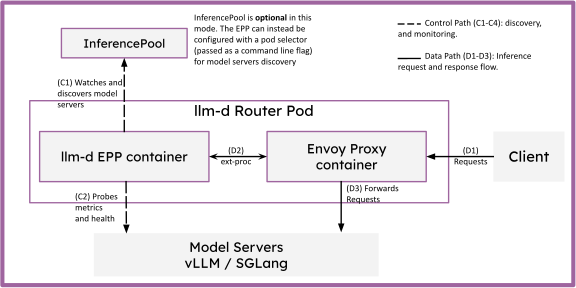
The standalone mode deploys a proxy as a sidecar to the EPP, offering a lightweight, flexible deployment mode without requiring Gateway API infrastructure.
When to Use
Standalone deployments are intended for workloads where the machinery of Gateway API creates too much operational overhead. This includes:
- Clusters using legacy Ingress controllers.
- Basic testing and local evaluations.
- Batch inference workloads.
- RL post-training pipelines.
Architecture
In standalone mode, the conformant proxy (e.g., Envoy) runs alongside the EPP in the same pod.
- Communication:
ext-proccommunication happens overlocalhost. - Simplification: No
Gateway,HTTPRoute, or gateway controller is needed. - Access: Traffic is sent directly to the EPP pod's externally exposed port.
Gateway Mode (Inference Gateway)
Gateway Mode, also known as the Inference Gateway, leverages the official Kubernetes Gateway API project focused on L4 and L7 networking, representing the next generation of Kubernetes Load Balancing and Service Mesh APIs.
When to Use
Gateway Mode is targeted at production environments that require:
- Shared Infrastructure: A single, shared Gateway can host multiple HTTP/gRPC routes for both inference workloads (represented as
InferencePool) and traditional applications (standard KubernetesServiceobjects). - Integration with cloud-native L7 networking solutions (Istio, GKE Gateway, Agentgateway).
- Multi-cluster load balancing.
- Advanced traffic management (weighted splitting, mirroring).
- Exposure of endpoints to external workloads with robust control.
Architecture
The Gateway API Inference Extension (GAIE) extends Gateway API by leveraging Envoy's External Processing to inject LLM-aware load balancing into the production-grade networking provided by the Gateway provider.
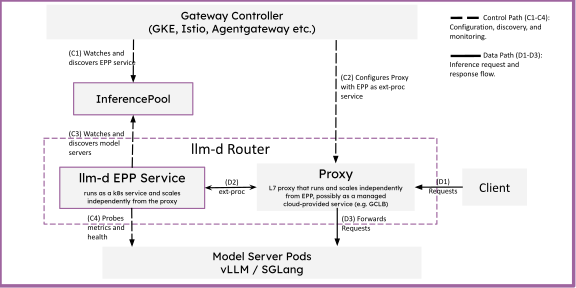
To connect an InferencePool (and the EPP it selects) to a Gateway, you use an HTTPRoute that references the pool as its backend. One of the powerful features of Gateway Mode is the ability to host complex routing topologies: a single Gateway can host multiple HTTPRoute objects, and each route can be configured with multiple InferencePool backends (e.g., for canary rollouts or traffic splitting) or a standard Kubernetes Service.
The following diagram illustrates the hierarchical routing structure in Gateway Mode, showing how requests are matched and distributed across multiple InferencePools and traditional Services:
                          +-----------------------+
                          |        Gateway        |
                          | (Industry-Grade Proxy)|
                          +-----------+-----------+
                                      |
                  ____________________|____________________
                 |                                         |
         Path/Header Match                         Path/Header Match
         +-------v-------+                         +-------v-------+
         |   HTTPRoute   |                         |   HTTPRoute   |
         |  (Inference)  |                         | (Traditional) |
         +-------+-------+                         +-------+-------+
                 |                                         |
         ________|________                                 |
        |                 |                                |
   Match/Weight      Match/Weight                    Match/Weight
 +-----v-------+   +-----v-------+                 +-------v-------+
 |InferencePool|   |InferencePool|                 |    Service    |
 |     (A)     |   |     (B)     |                 |     (Web)     |
 +-------------+   +-------------+                 +---------------+
Traffic is first matched against an HTTPRoute rule (typically using path or header matches). If the selected backend in that rule is an InferencePool, the request is parked while the EPP configured for that InferencePool is consulted for an inference-optimized routing decision.
| Example Gateway | Example HTTPRoute |
| |
Deployment Guides
llm-d provides Gateway Mode deployment guides for the following Gateways: